Summary
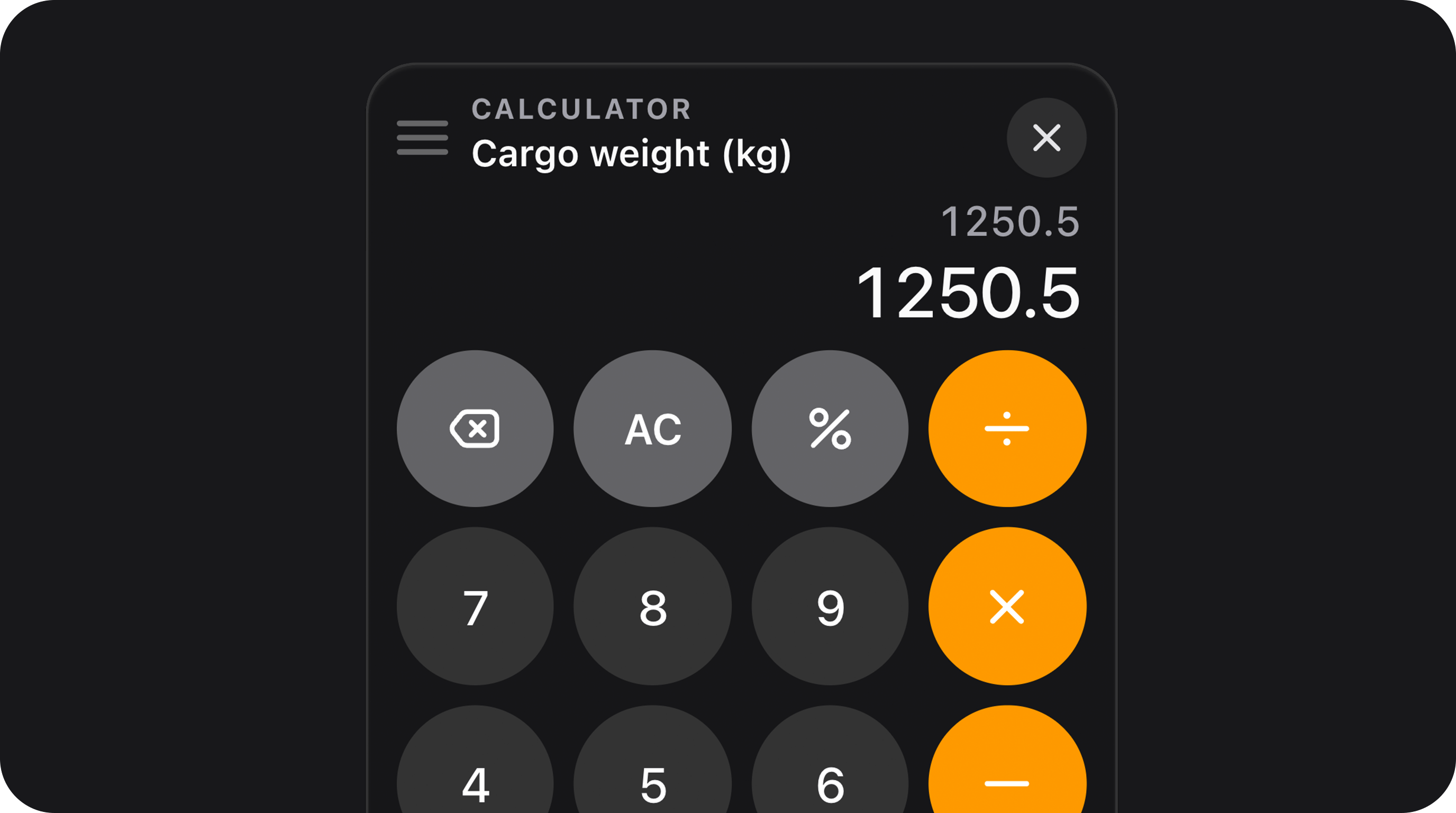
Numeric text input with a calculator trigger and a shared floating panel (one panel per page). Users can type directly or open the keypad to build expressions, preview results live, and Insert the computed value into the active field. EachCalculatorField keeps its own expression session — switch fields without closing the panel.
| Class | Bjanczak\FilamentFlexFields\Filament\Forms\Components\CalculatorField |
| State type | int|float|null when nullable() |
| Model cast | 'weight' => 'decimal:2' · 'quantity' => 'integer' |
| FieldType | (no dedicated FieldType mapping yet — use the class directly) |
| Playground | calculator-field slug in Flex Fields playground |
| Default variant | primary |
| Default size | md |
| Default rounding mode | truncate |
required(), disabled(), readOnly(), hidden(), live(), afterStateUpdated(), validation rules, etc.
Panel at a glance
| Viewport | Behavior |
|---|---|
Desktop (≥768px) | Floating glass panel near the trigger; draggable header; backdrop dismiss |
Mobile (<768px) | Bottom sheet with drag handle, larger keys, safe-area padding |
| Feature | Detail |
|---|---|
| Singleton panel | One teleported panel serves every CalculatorField on the page |
| Per-field sessions | Expression, result preview, and label are remembered per field id |
| Context switch | Open panel on field A, click field B’s trigger — panel stays open and restores B’s session |
| Display vs Insert | Panel shows full precision while typing; field constraints apply only on Insert |
@once in the field Blade view (data-fff-calculator-panel-host).
Basic usage
Standard weight input
Filament resource form
Integer-only quantity
State & validation
Stored value
State is a numeric value (int or float) or null when nullable and empty.
Validation rules (built-in)
| Rule | When |
|---|---|
integer | When ->integer() |
min:$n | When ->minValue($n) and value is filled |
max:$n | When ->maxValue($n) |
max_digits:$n | When ->maxLength($n) — counts digits only (ignores ., -) |
required | When ->required() |
Direct typing vs calculator Insert
| Stage | What happens |
|---|---|
| Panel display | Full-precision preview; decimalPlaces() does not round the live result |
| Insert / blur / input | normalizeNumericFieldValue() applies decimalPlaces, roundingMode, min/max, step, integer |
->decimalPlaces(2) and ->roundingMode('truncate'), typing 9.9999 in the panel shows 9.9999; Insert stores 9.99.
Numeric constraints
All methods acceptClosure unless noted.
| Method | Type | Default | Description |
|---|---|---|---|
minValue(scalar|Closure|null $value) | Setup | null | Lower bound; adds min: validation rule |
maxValue(scalar|Closure|null $value) | Setup | null | Upper bound; adds max: validation rule |
step(int|float|Closure $step) | Setup | 1 | Snap inserted/typed values to nearest step |
integer(bool|Closure $condition = true) | Setup | false | Restrict to whole numbers; adds integer rule |
decimalPlaces(int|Closure|null $places) | Setup | null | Fixed decimal precision on normalize |
maxLength(int|Closure|null $length) | Setup | null | Max digit count (ignores non-digits) |
roundingMode(string|Closure $mode) | Setup | 'truncate' | round, ceil, floor, or truncate |
Rounding modes
Max digit length
Useful for database columns with fixed precision:Visual options
Built on FlexTextInput styling — same variant and size tokens.Variants
Sizes
sm, md, lg).
Rounding (border radius)
rounding() overrides the global default from config/filament-flex-fields.php (ui.field_rounding).
Placeholder & calculator icon
GravityIcon::make('calculator').
Read-only & disabled
Calculator keypad semantics
iOS-style layout: digits,AC, ±, %, +, −, ×, ÷, decimal, equals, backspace.
Operators & precedence
Standard infix evaluation with+, −, ×, ÷, parentheses, and unary minus. Multiplication and division bind tighter than addition and subtraction.
Percent (%)
Divides the last operand by 100 (iOS behavior):
Expression before % | After % |
|---|---|
9 | 0.09 |
9+6-9 | 9+6-0.09 |
Sign toggle (±)
Negates the last operand. After an operator, negatives use parentheses:
| Expression | After ± |
|---|---|
12+5 | 12+(-5) |
12+(-5) | 12+5 |
All clear (AC)
Clears the expression and resets the display to 0. Insert after AC writes 0 into the field (subject to normalization).
Equals (=)
Replaces the expression with the computed result so you can continue calculating.
Insert
Writes the primary display value into the active field, normalizes it, syncs Livewire state, and keeps the panel open. The field trigger showsis-panel-target while its session is active.
Complete configuration API
| Method | Type | Default | Description |
|---|---|---|---|
variant(string|Closure $variant) | Setup | 'primary' | primary, secondary, flat, soft |
size(string|ControlSize|Closure $size) | Setup | 'md' | sm, md, lg |
rounding(string|Closure|null $rounding) | Setup | config | Border radius token |
placeholder(string|Closure|null $placeholder) | Setup | '0' (translated) | Empty input hint |
calculatorIcon(string|BackedEnum|Htmlable|Closure|null $icon) | Setup | Gravity calculator | Trigger button icon |
focusOutline(bool|Closure $condition = true) | Setup | false | Show focus ring on input |
minValue, maxValue, step, integer, decimalPlaces, maxLength, roundingMode | Setup | see above | Numeric constraints |
required(), disabled(), readOnly() | Setup | — | Standard Filament field APIs |
Public helper methods
| Method | Returns | Description |
|---|---|---|
getVariant() | string | Resolved visual variant |
getSize() | string | Resolved size token |
getRounding() | string | Resolved rounding token |
getMinValue() / getMaxValue() | scalar|null | Bounds |
getStep() | int|float | Step increment |
isInteger() | bool | Whole-number mode |
getDecimalPlaces() | ?int | Decimal precision |
getMaxLength() | ?int | Max digit count |
getRoundingMode() | string | Active rounding mode |
getCalculatorIcon() | string|BackedEnum|Htmlable | Trigger icon |
getCalculatorFieldId() | string | Session key (state path or field name) |
getWrapperClasses() | list<string> | CSS class list for the root |
shouldShowFocusOutline() | bool | Focus ring visibility |
Real-world examples
Shipping form with live total
Margin with percent-friendly calculator
Wizard step — optional estimate
Strict integer inventory
Database & Eloquent
Migration
Model
Assets & deployment
| Asset type | Bundles | How |
|---|---|---|
| CSS | calculator-field, calculator-panel (depends on flex-text-input) | Lazy-loaded when field renders |
| Alpine JS | calculator-field.js, panel behavior | Filament x-load on demand |
| Panel mount | calculator-panel-mount.blade.php | Rendered once per page |
calculator-field → flex-text-input, calculator-panel.
Accessibility
- Field root uses
role="group"witharia-labelfrom the field label. - Calculator trigger exposes
aria-label(translatable Open calculator) andaria-expandedwhen active. - Panel close button has an accessible label; keypad keys are native
<button>elements. - Mobile bottom sheet includes a visual drag handle (
aria-hidden). - Respects
prefers-reduced-motionfor panel and context-switch animations.
filament-flex-fields::default.calculator.* (title, placeholder, open, apply, close).
Performance
| Mechanism | What it does |
|---|---|
| Lazy CSS | Loads calculator bundles only when a field renders |
| Lazy Alpine | Field and panel scripts load via Filament x-load |
| Singleton panel | One DOM portal regardless of field count |
| Session map | In-memory Map per field id — no server round-trips while calculating |
Playground
/admin/flex-fields-playground/calculator-field
See Playground for setup.
Related components
| Component | When to use instead |
|---|---|
| NumberStepper | Simple ± stepping without free-form math |
| CurrencyField | Locale-aware money input with minor-unit storage |
| FlexTextInput | Plain numeric text without a calculator |
| FlexSlider | Visual range selection |
CSS classes (reference)
Field
| Class | Role |
|---|---|
fff-calculator-field | Root wrapper |
fff-calculator-field--{sm|md|lg} | Size variant |
fff-calculator-field--{primary|secondary|flat|soft} | Visual variant |
fff-calculator-field__shell | Input shell (shared with FlexTextInput) |
fff-calculator-field__row | Input + trigger row |
fff-calculator-field__control | Input control area |
fff-calculator-field__input-wrap | Input wrapper |
fff-calculator-field__input | Native text input |
fff-calculator-field__trigger | Calculator open button |
fff-calculator-field__trigger-icon | Trigger icon |
is-panel-target | Active field while panel is open for this session |
is-disabled / is-read-only | Locked states |
fff-flex-text-input and fff-flex-text-input--{size\|variant} classes.
Panel (teleported)
| Class | Role |
|---|---|
fff-calculator-panel-portal | Teleport wrapper |
fff-calculator-panel__backdrop | Click-outside dismiss layer |
fff-calculator-panel | Panel root |
fff-calculator-panel.is-mobile | Bottom-sheet layout |
fff-calculator-panel.is-open / .is-closing | Animation states |
fff-calculator-panel.is-dark | Dark color scheme |
fff-calculator-panel__header | Draggable header (desktop) |
fff-calculator-panel__drag | Mobile drag handle |
fff-calculator-panel__display | Expression + result area |
fff-calculator-panel__expression | Current expression line |
fff-calculator-panel__result | Live result / preview |
fff-calculator-panel__keypad | Key grid |
fff-calculator-panel__key | Individual key |
fff-calculator-panel__key.is-digit | Digit keys |
fff-calculator-panel__key.is-function | AC, ±, % |
fff-calculator-panel__key.is-operator | +, −, ×, ÷, = |
fff-calculator-panel__btn--primary | Insert button |
data-fff-calculator-panel-host | Singleton mount marker (once per page) |