Summary
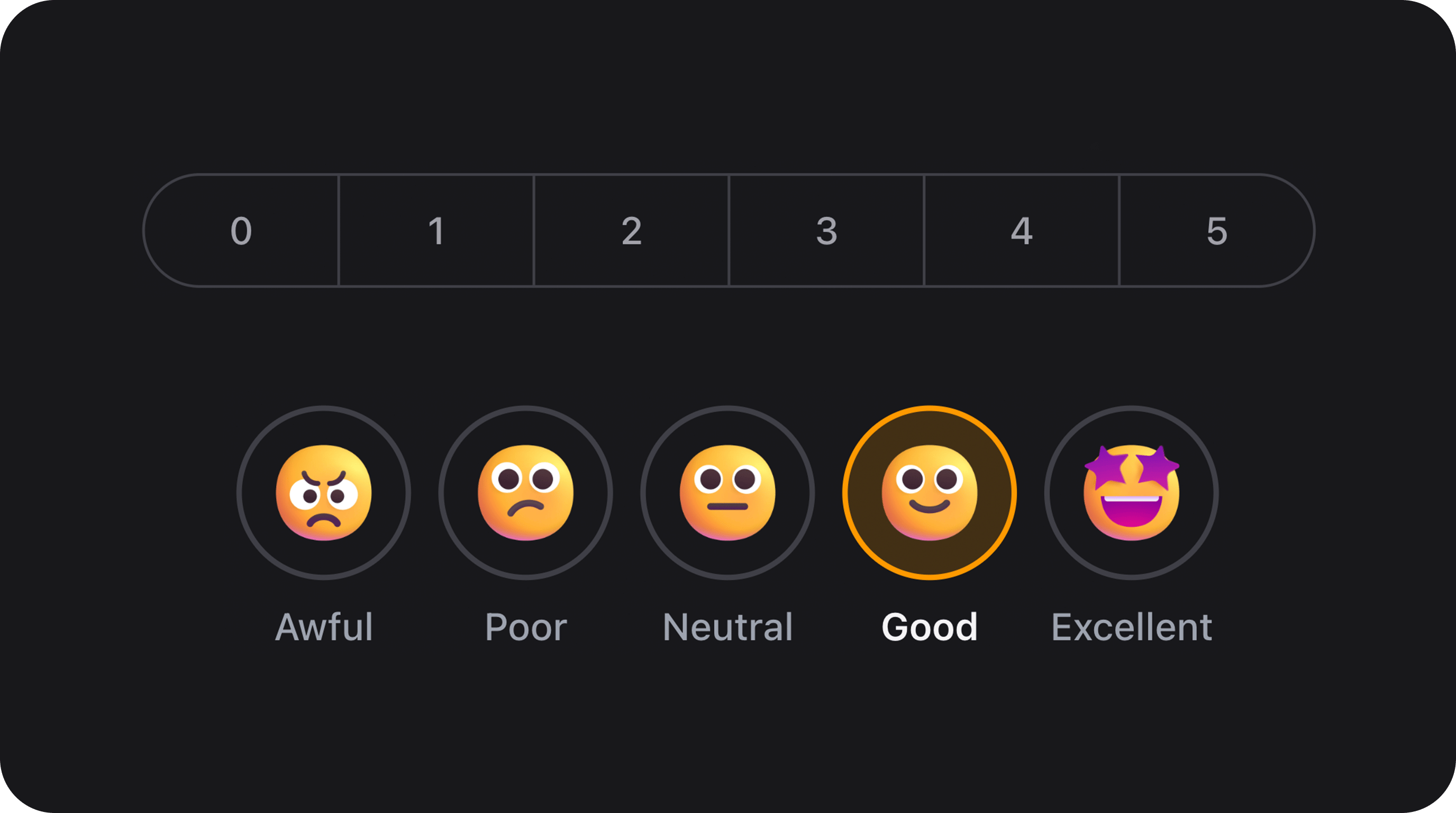
Single-select survey scale for Net Promoter Score (0–10), CSAT, satisfaction ratings, and textual Likert scales. Three visual variants share one API: pills (sliding segment control), segments (full-width bordered bar), and emojis (icon or image rings with labels).| Class | Bjanczak\FilamentFlexFields\Filament\Forms\Components\NpsField |
| State type | string|int|null — one option key, or null when unset |
| Model cast | 'nps_score' => 'integer' · 'feedback_agreement' => 'string' |
| FieldType | (no dedicated FieldType mapping yet — use the class directly) |
| Playground | nps-field slug in Flex Fields playground |
| Default variant | pills |
| Default scale | 0 through 10 (numeric keys and labels) |
| Default state | null (no pre-selection) |
required(), disabled(), hidden(), live(), afterStateUpdated(), validation rules, etc.
Variants at a glance
| Variant | Value | Best for |
|---|---|---|
| Pills | 'pills' (default) | Classic NPS 0–10, compact scales, sliding primary indicator |
| Segments | 'segments' | Full-width 0–10 bar, experience ratings, Likert with many options |
| Emojis | 'emojis' | Mood / satisfaction with icons or bundled emoji images |
Basic usage
Standard NPS (0–10)
Filament resource form
Color-coded NPS (Detractor / Passive / Promoter)
| Score | Tone | Selected color |
|---|---|---|
| 0–6 | Detractor | Red (danger) |
| 7–8 | Passive | Yellow (warning) |
| 9–10 | Promoter | Green (success) |
State & validation
Stored value
State is the option key fromoptions() — not the display label.
Default: empty initial state
The field defaults tonull. Nothing is selected until the user picks an option. All variants support this.
Validation rules (built-in)
| Rule | When |
|---|---|
nullable | Always (unless required()) |
Rule::in(...) | Value must match a configured option key |
required | When ->required() |
Optional fields — deselect on second click
When the field is notrequired(), clicking the already selected option clears the value back to null. Required fields always keep one selection.
Custom scales
5-point CSAT (1–5)
3-point quick rating
Textual Likert scale (string keys)
Dynamic options with a closure
Variant: Pills (default)
Sliding pill indicator on a gray track — same visual language as SegmentControl. Best for numeric scales and compact layouts.Sizes
sm, md, lg).
Rounding
rounding() overrides the global default from config/filament-flex-fields.php (ui.field_rounding).
Variant: Segments
Full-width bordered bar with vertical dividers between options. Ideal for 0–10 NPS and multi-option Likert rows.Segments with sizes and rounding
Variant: Emojis
Circular rings with a visual inside each option and a text label below. Three ways to supply visuals (priority order):icons()— Filament icon strings (Heroicon, Gravity, Blade Icons, …)emojiImages()— custom image URLs- Bundled webp — for numeric keys
0–4when neither of the above is set
Bundled emoji images (5-point mood scale)
resources/dist/assets/nps-field/emojis/0.webp … 4.webp) and are published to public/filament-flex-fields-assets/ via php artisan filament:assets.
Custom Gravity / Heroicon icons
icons() is set for a key, it overrides bundled webp for that key.
Custom image URLs
Emoji sizes
Color coding & custom colors
Built-in NPS color coding
Custom per-option background colors
Map Filament semantic names, hex, or rgb to option keys:Custom selected text colors
colorCoded() is enabled, built-in detractor/passive/promoter colors apply unless you override with colors() / textColors().
Disabled options
Disable individual keys without disabling the whole field:disabled():
Edge labels
Show helper text under the left and right ends of the scale:options() values.
Complete configuration API
All methods acceptClosure unless noted.
| Method | Type | Default | Description |
|---|---|---|---|
variant(string|Closure $variant) | Setup | 'pills' | Visual variant: pills, segments, emojis |
options(array|Closure $options) | Setup | 0–10 | Option keys => display labels |
minLabel(string|Closure|null $label) | Setup | null | Left extreme caption |
maxLabel(string|Closure|null $label) | Setup | null | Right extreme caption |
colorCoded(bool|Closure $condition = true) | Setup | false | NPS detractor/passive/promoter colors |
colors(array|Closure|null $colors) | Setup | [] | Custom selected background colors per key |
textColors(array|Closure|null $textColors) | Setup | [] | Custom selected text colors per key |
icons(array|Closure $icons) | Setup | [] | Emoji variant: key => Filament icon string |
emojiImages(array|Closure|null $images) | Setup | null | Emoji variant: key => image URL |
disabledOptions(array|Closure $keys) | Setup | [] | Keys that cannot be selected |
size(string|ControlSize|Closure $size) | Setup | 'md' | Control size: sm, md, lg |
rounding(string|Closure|null $rounding) | Setup | config | Border radius token |
default(mixed $state) | Setup | null | Initial state (Filament API) |
required(bool|Closure $condition = true) | Setup | optional | Require a selection; disables deselect |
disabled(bool|Closure $condition = true) | Setup | — | Disable entire field (Filament API) |
Public helper methods
| Method | Returns | Description |
|---|---|---|
getOptions() | array<string|int, string> | Resolved options |
getOptionKeys() | list<string|int> | Option keys for validation |
getVariant() | string | Current variant |
isColorCoded() | bool | Whether color coding is active |
getOptionIcon(mixed $value) | ?string | Icon string for emoji variant key |
getEmojiImage(mixed $value) | ?string | Image URL for emoji variant key |
getOptionTone(mixed $value) | ?string | detractor, passive, promoter, or null |
isDetractor(mixed $key) | bool | NPS 0–6 |
isPassive(mixed $key) | bool | NPS 7–8 |
isPromoter(mixed $key) | bool | NPS 9–10 |
isOptionDisabled(string|int $key) | bool | Whether key is disabled |
Real-world examples
Post-purchase survey (CreateRecord)
Wizard step — optional NPS
Live reactive form
Infolist / table display (manual)
NpsField is a form component. Display stored values in tables with TextColumn or a custom column:
Database & Eloquent
Migration
Model
Assets & deployment
| Asset type | Location after publish | How |
|---|---|---|
| CSS / JS / Alpine | Filament public paths | php artisan filament:assets |
| Emoji webp (bundled) | public/filament-flex-fields-assets/nps-field/emojis/ | Same command |
FlexFieldAssets::assetUrl() with automatic ?v=filemtime cache busting.
On upgrade, run php artisan filament:assets (or use a Composer post-autoload-dump hook). See the main README Upgrading section.
Accessibility
- Root element uses
role="radiogroup"witharia-labelfrom the field label. - Each option is a
<label role="radio">witharia-checkedand keyboard support (Enter/Space). - Hidden native
<input type="radio">elements preserve form semantics. - Focus visible outline on keyboard navigation.
- Disabled options expose
aria-disabled="true".
Performance
| Mechanism | What it does |
|---|---|
| Lazy CSS | Loads segment-control + nps-field bundles only when the field renders |
| Lazy Alpine | nps-field.js loaded on demand via Filament x-load |
| SSR pre-selection | data-segment-selected on pills prevents layout flash before Alpine hydrates |
nps-field → segment-control (pills variant only).
Playground
/admin/flex-fields-playground/nps-field
See Playground for setup.
Related components
| Component | When to use instead |
|---|---|
| SegmentControl | Generic single-select segments without survey semantics |
| RatingField | Star/icon ratings with fractional display |
| MatrixChoiceField | Grid of radio/checkbox choices |
| ChoiceCards | Large card-style single or multi select |
CSS classes (reference)
| Class | Role |
|---|---|
fff-nps-field | Root wrapper |
fff-nps-field--variant-pills | Pills variant |
fff-nps-field--variant-segments | Segments variant |
fff-nps-field--variant-emojis | Emojis variant |
fff-nps-field--color-coded | NPS color coding active |
fff-nps-field--{sm|md|lg} | Size variant |
fff-nps-field__track | Options container |
fff-nps-field__segment | Segment variant option |
fff-nps-field__emoji-ring | Emoji variant circle |
fff-nps-field__extremes | min/max label row |
fff-segment-control, fff-segment-track, fff-segment-indicator, and fff-segment-item from SegmentControl.